
GEOS FOR TO2026
Abaque, the spreadsheet.
Abaque is the TO2026 spreadsheet, in the manner of geoCalc: a grid of 26 columns by 99 rows, formulas that recalculate by themselves, per-cell formats and styles, and export to today’s spreadsheets.
01 / CALCULATING
A spreadsheet, as in 1987.
- Formulas
A cell starting with = holds a formula: operations, comparisons, functions, ranges such as B4:D4. Everything recalculates as soon as a value changes.
- Relative and absolute references
Copying a formula shifts its references, except those marked with $: $A$1 always stays A1. “Fill down” and “fill right” fill a range.
- Formats and styles
General, fixed with 2 decimals, percent, thousands; bold, italic; left, centred, right or automatic alignment; the width of each column.
- Sort and export
Sorting orders the selected rows. The sheet is saved as .ABQ, with its formulas, and exported as .CSV for another spreadsheet.
The functions
Arguments are separated by a comma or a semicolon. Each function has its French and its English name.
A faulty formula shows its error in the cell: #REF (reference outside the grid), #DIV/0, #ERR, #NOM (unknown function).
SOMME, SUM | sum of a range or a list |
MOYENNE, AVERAGE | average; #DIV/0 on an empty range |
MIN, MAX | smallest and largest value |
NB, COUNT | number of values |
ABS | absolute value |
ENT, INT | integer part |
RACINE, SQRT | square root; #ERR if negative |
ARRONDI, ROUND | rounded to n decimals |
SI, IF | IF(condition; if true; if false) |
PI | 3.14159… |
02 / THE .ABQ FORMAT
A text file, cell by cell.
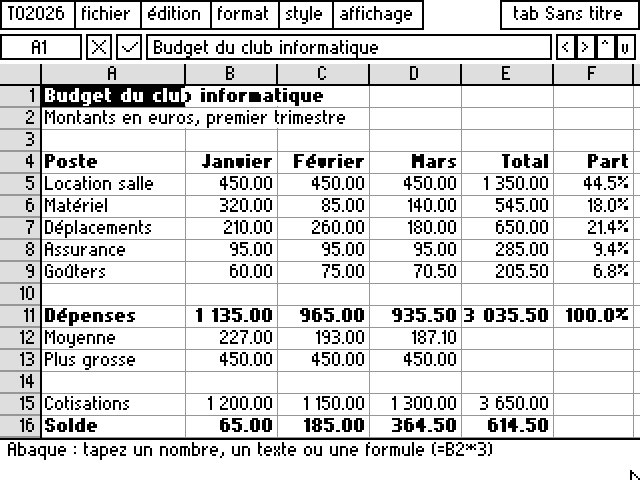
An Abaque sheet is a text file: the first line is ABAQUE 1, the second gives the column widths, then each non-empty cell takes one line: its column, its row, a code combining its format and style, a vertical bar and its content, formula included. Here is the start of the sample budget.
ABAQUE 1
W,72,46,46,46,46,40,44,44,...
1,1,256|Budget du club informatique
1,4,257|Poste
2,4,259|Janvier
1,5,0|Location salle
2,5,76|450
5,5,76|=SOMME(B5:D5)
6,5,40|=E5/E$11