
GEOS FOR TO2026
Plume, the word processor.
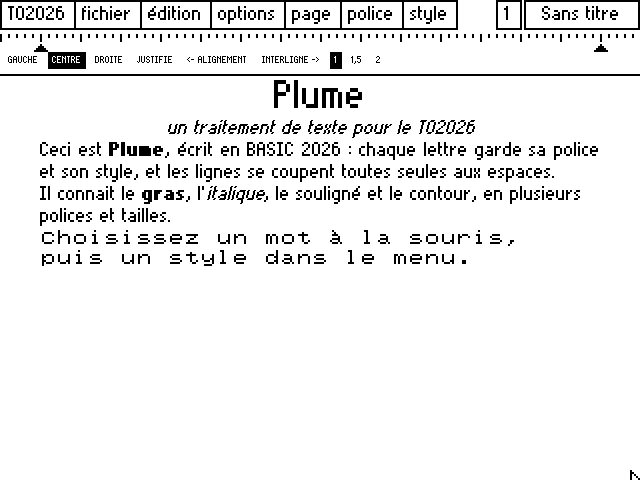
Plume is the TO2026 word processor, in the manner of geoWrite: every letter keeps its font and style, lines break by themselves at spaces, and the text is laid out as you see it.
01 / WRITING
What you see is what you write.
- Mixed fonts and styles
Select a word with the mouse, then a font or style in the menu: bold, italic, underline, outline, large. They combine.
- Paragraph alignment
Left, centred, right or justified: the ruler at the top of the page sets it for the paragraph holding the cursor.
- Line spacing
Single, 1.5 or double, for the whole text.
- Clipboard
Cut, copy, paste, select all: selection is made with the mouse, as in GEOS.
02 / THE .PLU FORMAT
A text file, readable by a human.
A Plume document is a plain text file: the first line is PLUME followed by the line spacing, then each paragraph fits on one line, preceded by its alignment (0 left, 1 centred, 2 right, 3 justified) and a vertical bar.
A change of font or style is written as the ESC character followed by two hexadecimal digits: the right-hand digit gives the style (1 bold, 2 italic, 4 underline, 8 outline, added together), the left-hand one the font (0 Bureau, 1 TO2026, 2 MO6), plus 4 for the large size. So a BASIC program can write a Plume document.
PLUME 0
1|<ESC>41Mon premier texte
1|<ESC>02sur le TO2026
0|
0|On peut mélanger <ESC>10la police TO2026<ESC>00, <ESC>20celle du MO6<ESC>00...